


TL;DR, Quick Answer
8 min readTo file the bugs Flowsery finds in session recordings as Linear issues, open Website settings > Integrations in Flowsery, click Connect on the Linear card and approve access in Linear. Create a ticket from any Flowsery issue by hand, or turn on Auto tickets, pick a Linear team and a minimum severity, and every new issue at or above it becomes a Linear issue with the recording attached. When the Linear issue moves to a completed or canceled state, Flowsery resolves its own copy.
Most Linear bug tracking starts with a person. Someone hits a broken checkout, writes it up from memory, guesses at the steps and pastes a screenshot into a new issue. Flowsery starts earlier. Its AI watches your session recordings, finds the rage clicks, dead buttons and broken forms real visitors ran into, and files each one in Linear with the recording attached, often before anyone on the team has noticed.
Flowsery is listed in Linear's integration directory under Bug Reporting. We build Flowsery, and every button name below matches the Linear card in a website's settings.

The short version: in Flowsery, open Website settings > Integrations, click Connect on the Linear card and approve access in Linear. Then click Create ticket on any issue, or turn on Auto tickets, pick a Linear team and a minimum severity, and let Flowsery file new bugs for you.
What does the Flowsery Linear integration do?
The Flowsery Linear integration turns the issues Flowsery's AI finds in session recordings into Linear issues, and resolves them in Flowsery when they are closed in Linear. It works in three ways:
- Create ticket. You open a Flowsery issue, pick a Linear team and create the Linear issue yourself.
- Auto tickets. Flowsery files every new issue at or above a minimum severity into one Linear team without anyone opening Flowsery.
- Sync back. When a Linear issue that Flowsery created is completed or canceled, Flowsery marks its own issue as resolved.
Flowsery groups every session that hit the same problem into one issue, so a bug that hit 38 sessions becomes one Linear issue with a session count, not 38 issues. That grouping is what makes automatic filing safe for a real backlog. The automatic bug tickets page shows how the issue list and the tickets fit together.
- Someone hits a broken checkout
- They write it up from memory
- They guess at the steps
- They paste a screenshot into a new issue
- The AI finds rage clicks, dead buttons and broken forms in recordings
- Sessions that hit the same problem group into one issue
- The Linear issue carries the severity, the session count and the recording video
- It is often filed before anyone on the team has noticed
What do you need before you connect Linear?
You need a Flowsery website with session recording turned on, an Admin or Editor role in the Flowsery workspace, and a Linear account in the workspace you want to file into. Flowsery finds issues in recorded sessions, so a website without session recording has nothing to send.
Any Linear member can approve the connection. You do not need to be a Linear admin. Flowsery members with other roles can see the connection but cannot change it.
Every Flowsery plan includes the Linear integration. That means Team at $250 a month and Pro at $500 a month, and both start with a 14-day free trial that needs no credit card.
How do you connect Linear to Flowsery?
You connect Linear to Flowsery from the website's Integrations tab, and Linear's own approval screen does the rest.
- In Flowsery, open the website and go to Website settings > Integrations.
- On the Linear card, click Connect.
- Click Connect with Linear. Flowsery sends you to Linear.
- Choose the Linear workspace and approve access. Flowsery asks for read access to list your teams and write access to create issues and upload recordings.
- Linear sends you back to Flowsery, and the card shows Connected with the name of your Linear workspace.
The connection belongs to the website, not to you or the workspace. If you track three websites in Flowsery and want all of them filing into Linear, connect each one. Every option is also on the Linear integration docs page.

How do you create a Linear issue from a Flowsery bug?
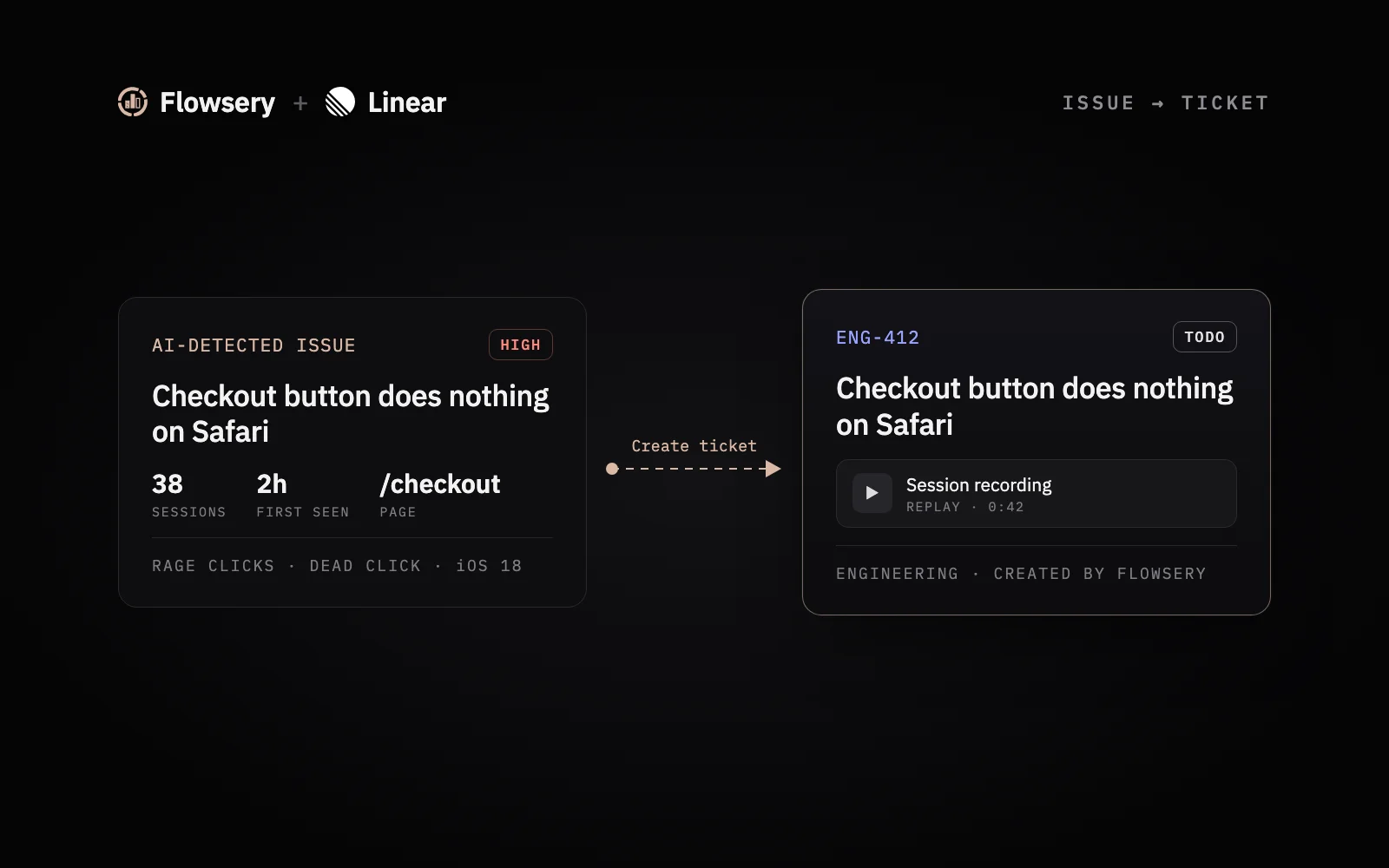
You create a Linear issue from a Flowsery bug by clicking Create ticket on the issue, picking Linear and a team, and clicking Create.
- Open an issue in Flowsery and click Create ticket.
- Pick Linear as the tracker, then pick the Team.
- Check the title, the description and the steps to reproduce, which Flowsery fills in for you, then click Create.
The Linear issue carries everything an engineer asks for in the first five minutes:
| Field in the Linear issue | Where it comes from |
|---|---|
| Title and description | The Flowsery issue, editable before you create it |
| Severity | Low, Medium, High or Critical, as Flowsery scored it |
| Sessions affected | How many recorded sessions hit the problem |
| First and last seen | When Flowsery first and most recently saw the problem |
| Links | The issue in Flowsery and the session recording |
| Attachment | The recording video itself |
The attached video is the part I would not give up. An engineer can watch the visitor tap the button three times without leaving Linear, which settles most "cannot reproduce" arguments before they start. Our guide to steps to reproduce covers why that list decides whether a bug gets fixed at all.

Flowsery
Start Your 14-Day Free Trial
Real-time dashboard
Goal tracking
Cookie-free tracking
How do you turn on automatic bug tickets in Linear?
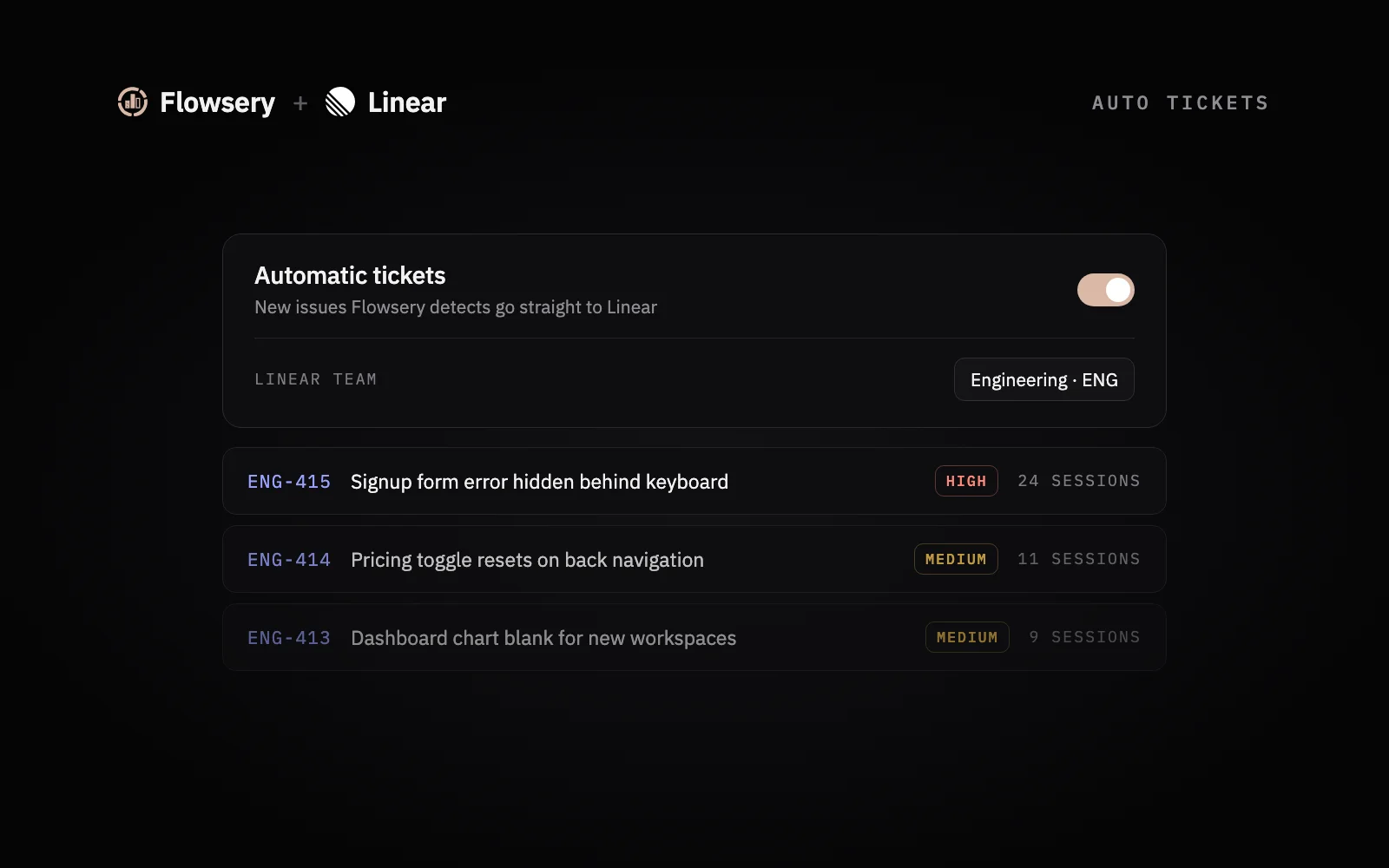
You turn on automatic bug tickets by switching on Auto tickets on the Linear card and choosing a Linear team and a minimum severity. The controls appear once Linear is connected.
- On the Linear card, turn on Auto tickets.
- Pick the Linear team that should receive the issues.
- Pick a Minimum severity.
From then on, every new issue Flowsery detects at or above that severity becomes a Linear issue in that team, with the same fields as a manual ticket. Each issue is filed once, and the Flowsery issue keeps a link to its Linear ticket.
Auto tickets go to one tracker per website. Turning them on for Linear turns them off for Jira or Notion on the same website. If the toggle is on and no team is picked, the card says Pick a destination to enable. and nothing is filed until you choose one.
Which minimum severity should you pick?
Pick High and above for a busy Linear team and Low and above for a small one that wants to see everything. The minimum severity is the only filter between Flowsery's issue list and your Linear backlog, so it decides how noisy the integration feels.
| Minimum severity | What reaches Linear |
|---|---|
| Low and above | Every new issue Flowsery detects |
| Medium and above | Medium, High and Critical issues |
| High and above | High and Critical issues |
| Critical only | Only issues Flowsery rates Critical |
Issues below the threshold stay in Flowsery, and you can still send any of them to Linear with Create ticket. My advice is to start one level stricter than you think you need. Loosening the filter after a quiet week is easy. Cleaning 40 Medium issues out of a sprint board is not.

What happens in Flowsery when you close the Linear issue?
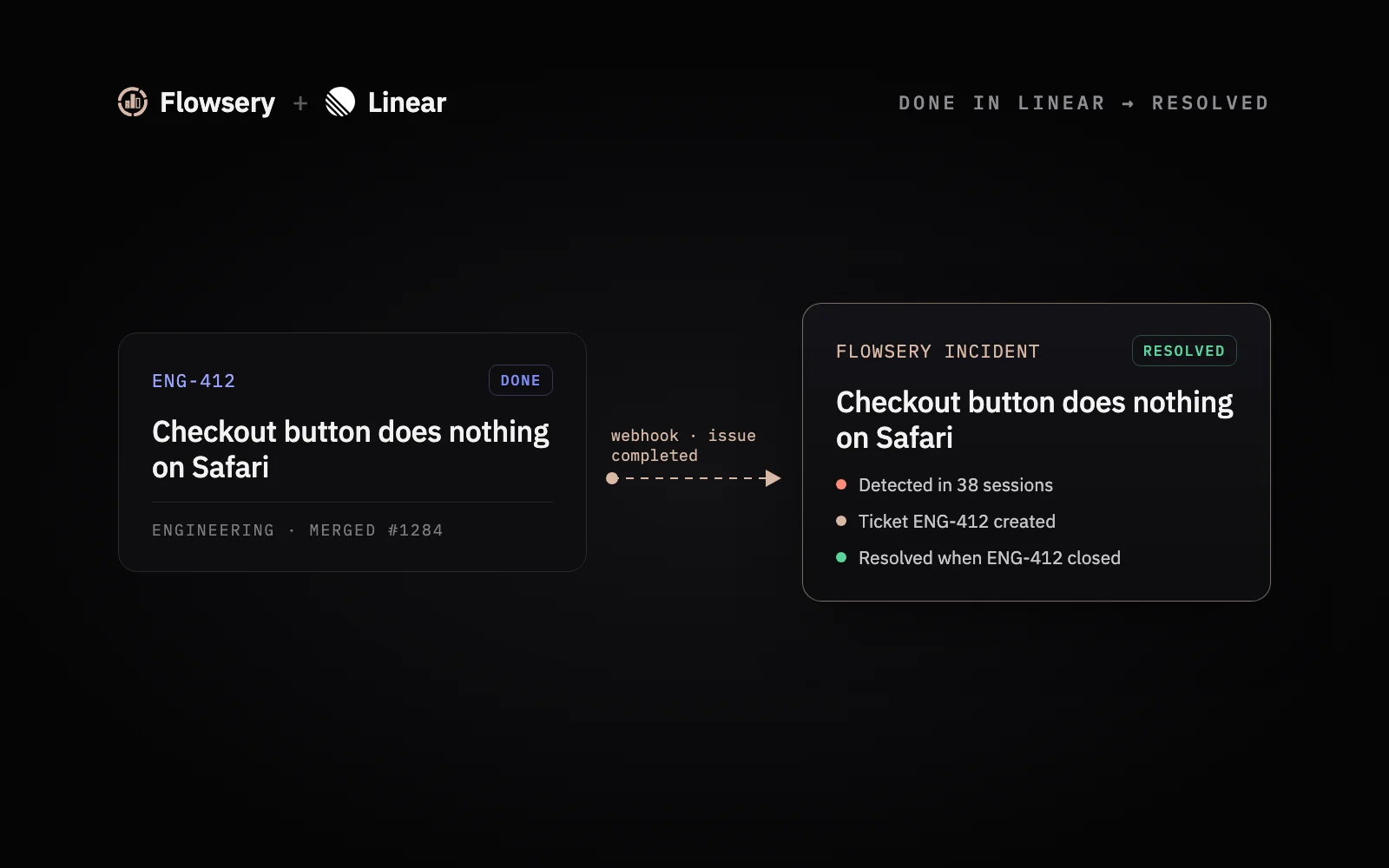
Flowsery marks its issue as resolved when the Linear issue it created moves to a completed or canceled state. Linear notifies Flowsery on its own, so there is no webhook to set up.
A few rules keep the sync from fighting your workflow:
- Only Flowsery issues that are still open or in progress change. An issue you already resolved or suspended in Flowsery stays as it is.
- Only issues Flowsery created in Linear count. A Linear issue someone wrote by hand does not touch Flowsery.
- Editing an issue that is already done in Linear does nothing.
The effect is that Flowsery's issue list stays in step with what engineering has shipped, and nobody has to close the same bug twice. If the bug comes back after the fix, Flowsery sees it in new recordings, which is a better regression signal than waiting for a support email.
How do you keep false positives out of your Linear backlog?
Mark a false positive as Not an issue in Flowsery, and Flowsery suspends it and adds a rule that skips similar reports. The same pattern then never comes back as a new ticket or alert.
Two other habits keep the backlog clean. Severity filtering, covered above, keeps Low issues out of Linear until you ask for them. And grouping means a recurring bug updates one Flowsery issue with a higher session count instead of filing a new ticket every time it happens. If your team already runs a weekly bug triage, the Flowsery issues arrive pre-ranked by severity and session count, which shortens that meeting.
What if the Linear card says Reconnect needed?
The Linear card says Reconnect needed when Flowsery lost access to the Linear workspace, usually because someone removed the app in Linear. Click Reconnect and approve access again. Your auto ticket settings stay as they were.
Flowsery
Start Your 14-Day Free Trial
Real-time dashboard
Goal tracking
Cookie-free tracking
Three other cases come up:
- The team list is empty. The Linear account that approved the connection is not in any team. Ask a Linear admin to add it to one, or reconnect with an account that is.
- The card says Connected with an API key. The website was connected before Flowsery supported OAuth. It keeps working. To move over, click Manage, then Switch to OAuth, and approve access in Linear. You can delete the old key in Linear afterwards.
- You want to stop. Click Manage, then Disconnect. Flowsery revokes its access in Linear and stops filing tickets for that website, including auto tickets. Issues already in Linear stay there.
When should you use Jira, Notion, Slack or n8n instead?
Use the Linear integration when your engineers plan their work in Linear. Flowsery's other routes cover teams that live somewhere else.
- Jira or Notion. Flowsery files tickets into a Jira project or a Notion database the same way, with Create ticket and Auto tickets. One website sends auto tickets to one tracker.
- Slack. Every Flowsery issue has Send to Slack, and the Slack to pull request flow lets you tag @flowsery in the thread to open a draft fix.
- ClickUp, Asana, Trello or GitHub Issues. The Flowsery Trigger in the n8n analytics workflows guide starts a workflow on every new issue and creates the task wherever you need it.
For what a good ticket should contain no matter where it lands, read how session replay bug reports reach engineers.
Frequently Asked Questions
Does Flowsery work with Linear?
Flowsery works with Linear through an OAuth integration listed in Linear's integration directory under Bug Reporting. It creates Linear issues from the bugs Flowsery finds in session recordings, by hand or automatically, and resolves them in Flowsery when they are closed in Linear.
Do you need to be a Linear admin to connect Flowsery?
Any Linear member can approve the Flowsery connection, and no Linear admin is needed. On the Flowsery side you need the Admin or Editor role in the workspace. The Linear account you approve with must belong to at least one team, or the team list stays empty.
What does a Linear issue from Flowsery contain?
A Linear issue from Flowsery contains the title, description, severity, number of affected sessions, and when the bug was first and last seen. It links to the issue in Flowsery and to the session recording, and Flowsery attaches the recording video to the Linear issue.
Can Flowsery file Linear issues automatically?
Flowsery files Linear issues automatically once you turn on Auto tickets on the Linear card, pick a Linear team and set a minimum severity. Every new issue at or above that severity becomes a Linear issue in that team, and each issue is filed once.
Does closing a Linear issue resolve the bug in Flowsery?
Closing a Linear issue that Flowsery created resolves the matching Flowsery issue when the Linear issue moves to a completed or canceled state. Only Flowsery issues that are still open or in progress change, and Linear notifies Flowsery without any setup.
How much does the Flowsery Linear integration cost?
Every Flowsery plan includes the Linear integration. Team costs $250 a month and Pro costs $500 a month, and both start with a 14-day free trial that needs no credit card.
Can you choose which Linear team Flowsery files into?
You pick the Linear team each time you create a ticket by hand. For Auto tickets, you pick one Linear team on the Linear card, and every new issue at or above your minimum severity goes there. If the toggle is on and no team is picked, nothing is filed.
Will Flowsery file the same bug in Linear twice?
Flowsery files each issue once, and the Flowsery issue keeps a link to its Linear ticket. It also groups every session that hit the same problem into one issue. A bug that hit 38 sessions becomes one Linear issue with a session count, not 38 issues.
How do you disconnect Linear from Flowsery?
Open the Linear card in Website settings > Integrations, click Manage, then click Disconnect. Flowsery revokes its access in Linear and stops filing tickets for that website, including auto tickets. Issues already in Linear stay there.
Can one website send automatic tickets to Linear and Jira?
Auto tickets go to one tracker per website. Turning them on for Linear turns them off for Jira or Notion on the same website. Issues below your minimum severity stay in Flowsery, and you can still send any of them with Create ticket.
Was This Article Helpful?
Let us know what you think!
See us more often in Google
One click marks Flowsery as a preferred source, so our articles sit higher in your Top Stories, AI Mode, and AI Overviews.
Before you go...
Flowsery
Revenue-first analytics for your website
Track every visitor, source, and conversion in real time. Simple, powerful, and cookie-free.
Real-time dashboard
Goal tracking
Cookie-free tracking
Related Articles


How to Run a Notion Bug Tracker That Fills Itself From Session Replays
Set up a Notion bug tracker that Flowsery fills for you: each issue found in session replays becomes a row with severity, sessions affected and a recording.


How to Set Up Hermes Agent Analytics With the Flowsery Plugin
Set up Hermes Agent analytics with the Flowsery plugin: two commands, one OAuth sign-in, 28 tools for traffic, revenue and bugs, and a prompt before writes.

How to Set Up n8n Analytics Workflows With the Flowsery Node
Set up n8n analytics with the Flowsery node: one API token, a weekly traffic report, alerts for bugs found in session recordings, and sales from any app.