
TL;DR, Quick Answer
8 min readTo use Flowsery in ChatGPT, open the Flowsery plugin in ChatGPT, click "Install plugin" and sign in with your Flowsery account. Then ask how your websites are doing. ChatGPT reads visitors, sessions, bounce rate, conversions and revenue by page, source, campaign, location or device, lists the issues Flowsery found in recorded sessions and can mark them resolved. The only data it changes is an issue status and goal completions, and it reaches the workspaces where you are an Admin or Editor.
You can ask how your website is doing in plain words once Flowsery is installed as a ChatGPT analytics plugin. The Flowsery plugin is approved and listed in ChatGPT, so there is no API key to copy and no developer mode to turn on. You install the plugin, sign in with your Flowsery account, and ChatGPT answers from your real traffic, revenue and session recordings.
The short version: open the Flowsery plugin in ChatGPT, click "Install plugin" and sign in with the email you use on Flowsery. Then ask "Show my website traffic this month". If ChatGPT answers with your visitors and sessions, the plugin works.
What is the Flowsery plugin in ChatGPT?
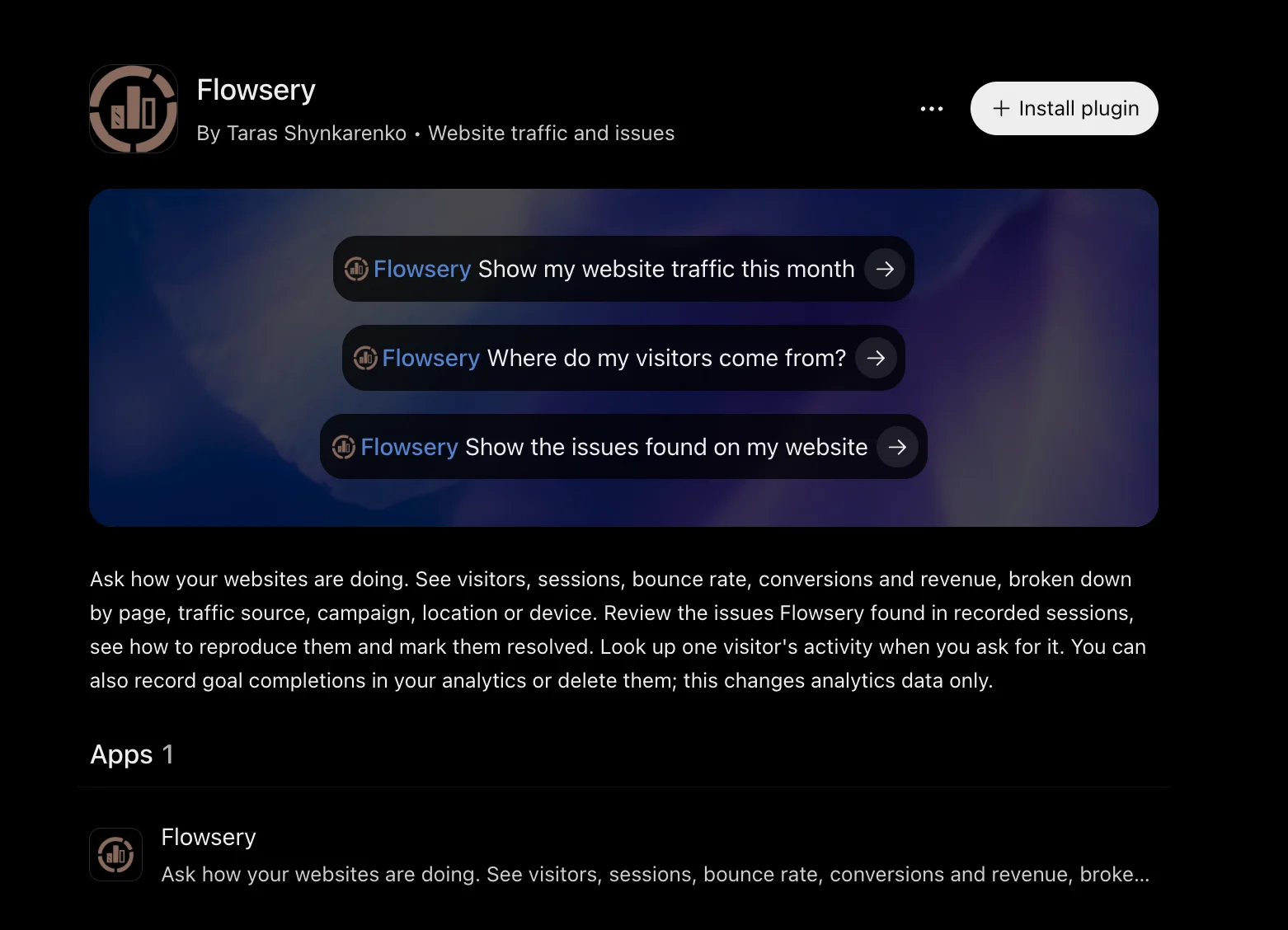
The Flowsery plugin turns ChatGPT into an AI agent for your Flowsery account. ChatGPT lists it as "Flowsery, By Taras Shynkarenko, Website traffic and issues". In Flowsery, ChatGPT sits on the AI Agents tab of the API Tokens page, next to the Claude connector, the Grok Bot template, OpenClaw and the Flowsery CLI.
The plugin runs on Flowsery's hosted MCP server at https://mcp.flowsery.com/mcp, the same server Claude, Cursor and other MCP clients use. That server has 26 tools. 23 of them only read, and 3 change data: one updates an issue's status, one records goal completions and one deletes them.
Before the listing, ChatGPT users added that server by hand in developer mode. The listed plugin skips that step, and an always-on dot uses the same plugin, as shown in the OpenAI dots plugin for web analytics guide.
- Turn on developer mode in ChatGPT
- Add the MCP server by hand with its URL
- Click Install plugin
- Sign in with your Flowsery account
- No API key and no developer mode
What do you need before you start?
You need a ChatGPT account and a Flowsery account with at least one website that runs the Flowsery tracking script. Your Flowsery role matters too: the plugin needs the flowsery.write permission, which the Admin and Editor roles hold, so it reaches only the workspaces where you are an Admin or Editor.
Flowsery's Team plan ($250 a month) and Pro plan ($500 a month) both include the ChatGPT plugin, and both start with a 14-day free trial that needs no card.
How do you add Flowsery to ChatGPT?
You install Flowsery from its listing in ChatGPT and sign in once:
- Open the Flowsery plugin in ChatGPT while signed in to ChatGPT.
- Click "Install plugin". ChatGPT opens the Flowsery sign-in page.
- Sign in with the email you use on Flowsery and allow access.
- In a new chat, ask: "Show my website traffic this month."
If ChatGPT says your email has no Flowsery account, disconnect the plugin and connect again with the email your Flowsery account uses.
If you belong to several workspaces, for example one per client, name one in your message, such as "in the Acme workspace". ChatGPT then lists your workspaces and works in that one. Without a name, it uses your default workspace.
What can ChatGPT do with the Flowsery plugin?
Here is what ChatGPT can do through the Flowsery plugin, grouped by task:
- Traffic. Headline totals for any date range: visitors, sessions, bounce rate, average session duration, revenue, revenue per visitor and conversion rate. A trend by hour, day, week or month. How many people are on the site now, and a map of the visitors from the last 5 minutes with their city, browser and current page.
- Breakdowns. Visitors by page, referrer, channel, campaign, country, region, city, device, browser, operating system, hostname or goal, plus a breakdown by any of 25 dimensions, UTM parameters included. Filters combine, so "mobile visitors from Germany" is one question.
- Issues. The bugs, broken flows and UX problems Flowsery's AI found in session recordings, filtered by status or severity. For one issue, every occurrence, the sessions behind it, the steps to replicate, comments and any linked Linear or Jira ticket. ChatGPT can also change an issue's status.
- One visitor. When you ask about a specific visitor, their country and city, device, traffic source, visits, pages, goals, revenue totals and a timeline. Names, emails, user IDs, IP addresses and billing details are never returned.
- Goals. Completion counts per goal, recording a goal completion, and deleting recorded completions.
- Websites and workspaces. Your websites with their timezone and currency, and the workspaces your sign-in reaches.
The ChatGPT plugin does not record or delete payments, add websites, change website settings, create API tokens or delete issues. Do those in Flowsery, or use the n8n node or the Zapier app for payments.

What prompts can you try first?
Under each prompt is what ChatGPT does in Flowsery. The first three are the example prompts on the Flowsery listing in ChatGPT.

Flowsery
Start Your 14-Day Free Trial
Real-time dashboard
Goal tracking
Cookie-free tracking
"Show my website traffic this month"
ChatGPT reads this month's overview for your website: visitors, sessions, bounce rate, average session duration, revenue and conversion rate. Ask "compare it with last month" next, and it runs the same report for the month before. If the numbers start at the wrong hour, name a timezone, such as "in Berlin time".
"Where do my visitors come from?"
ChatGPT reads your referrers and channels for the last 30 days, the default window when you name no dates. Follow with "which of those sources brought revenue?" to see revenue next to each source, or "only campaigns" for your UTM campaigns.
"Show the issues found on my website"
ChatGPT lists the open issues with their severity, status, sessions affected and when each was first and last seen. Flowsery sorts them by severity, so ask "sort them by sessions affected" to see which bug reaches the most visitors. Then ask about one issue to get the steps to replicate and the sessions behind it.
"Which pages do mobile visitors from Germany land on?"
ChatGPT runs an entry page breakdown with a country filter and a device filter in one call. Filter values follow Flowsery's own labels, such as Mobile for the device and the full region name California, the same labels the breakdowns show.
"Mark the Safari checkout issue as resolved"
ChatGPT finds the issue, changes its status to resolved and shows you the updated issue. Only the status changes; the title, severity, occurrences and comments stay, and you can set any status again later.
Does ChatGPT change anything in Flowsery without asking?
ChatGPT changes Flowsery data through three tools only, and all three touch analytics data, never your website, your tracking script or your billing.
- Update Issue Status sets an issue to open, in progress, resolved or suspended. It is reversible. Suspended hides an issue from the default list, so an issue that vanished from the list was suspended, not deleted.
- Track Goal Event records one goal completion. Each call adds a completion, so asking twice counts the goal twice.
- Delete Goal Events permanently deletes recorded completions that match a goal name, a visitor or a date range. It needs at least one of those filters, and its instructions tell ChatGPT to restate the website, the filters and the range and get your explicit confirmation first. The goal itself stays.
- Overview, trend, realtime count and live map
- Breakdowns by page, source, campaign, location and device
- Issues and one issue's evidence
- One visitor's activity, without names or emails
- Update an issue's status
- Record a goal completion
- Delete goal completions, after you confirm
Your Flowsery role applies, because the plugin acts as you. If a workspace admin lowers your role below Editor, the plugin loses that workspace and ChatGPT says your role does not allow it.
Why does ChatGPT show the wrong website or no numbers?
ChatGPT shows the wrong numbers when it is reading the wrong workspace, the wrong website or the wrong dates. Three checks fix almost every case:
- Workspace. Without a workspace name, the plugin works in your default workspace. Name the client or workspace in the message.
- Website. With several websites, say which domain you mean, such as "for shop.example.com".
- Dates and timezone. Reports default to the last 30 days in the website's timezone. Name the dates you want, and a timezone if your team works in another one.
On a free trial, Flowsery lists only the first 10 issues, so ChatGPT cannot show later issues until the workspace is on a paid plan. When a filter returns nothing, check the case: Mobile works and mobile returns an empty list.
What about Claude, n8n and Zapier?
Claude connects to the same MCP server through the Flowsery connector in Claude's directory, and Cursor and other MCP clients connect by URL. The AI agents page shows each setup.
If you want numbers delivered on a schedule instead of asked for in a chat, use an automation. The Flowsery n8n node sends weekly reports and new-issue alerts from your own server, and the Zapier analytics guide builds the same flows without one. For questions that start in a chat and end in a decision, the plugin is the shorter path. Why analytics tools show different numbers helps when ChatGPT's answer and another tool's report disagree.
Frequently Asked Questions
Is Flowsery available as a ChatGPT plugin?
Flowsery is listed as a plugin in ChatGPT under "Flowsery, By Taras Shynkarenko, Website traffic and issues". Open the listing, click "Install plugin" and sign in with your Flowsery account. No developer mode and no API key are needed.
Do I need an API key to use Flowsery in ChatGPT?
You do not need an API key to use Flowsery in ChatGPT. The plugin signs in with OAuth, so you log in with your Flowsery account and allow access. API keys are for n8n, Zapier, scripts and clients without a sign-in flow, and you create them at flowsery.com/api-tokens.
Can ChatGPT see my visitors' names or emails?
ChatGPT never receives names, emails, user IDs, IP addresses or billing details through the Flowsery plugin. A single visitor's profile shows country and city, device, traffic source, visits, pages, goals and revenue totals, and the live map rounds coordinates to 0.1 degrees.
Which Flowsery role does the ChatGPT plugin need?
The ChatGPT plugin needs the Admin or Editor role in a Flowsery workspace, because both hold the flowsery.write permission the Flowsery API checks. The plugin reaches only the workspaces where you hold one of those roles.
Flowsery
Start Your 14-Day Free Trial
Real-time dashboard
Goal tracking
Cookie-free tracking
Can the ChatGPT plugin record revenue?
The ChatGPT plugin does not record or delete payments. Revenue reaches Flowsery through the Stripe, Paddle, Polar or Lemon Squeezy connection, or through Track Payment in the n8n node, the Zapier app, the CLI or the API.
How do I remove ChatGPT's access to Flowsery?
Remove the Flowsery plugin from ChatGPT. A workspace admin can also lower your Flowsery role below Editor, and the plugin then loses that workspace on the next request.
How much does the Flowsery ChatGPT plugin cost?
The ChatGPT plugin is included in Flowsery's Team plan ($250 a month) and Pro plan ($500 a month). Both start with a 14-day free trial that needs no card. On a free trial, Flowsery lists only the first 10 issues, so ChatGPT cannot show later ones until the workspace is on a paid plan.
Can ChatGPT delete my analytics data?
Only recorded goal completions, and only through the Delete Goal Events tool. It needs a goal name, a visitor or a date range, and ChatGPT is told to restate the website, the filters and the range and get your confirmation first. The goal itself stays, and ChatGPT cannot delete issues, payments or websites.
Does the Flowsery plugin work with Claude and Cursor?
Claude and Cursor use the same hosted MCP server at https://mcp.flowsery.com/mcp. Claude connects through the Flowsery connector in its directory, and Cursor and other MCP clients connect by URL. Only ChatGPT has the listed plugin with the Install plugin button.
How do I make ChatGPT use the right workspace?
Name the workspace in your message, such as "in the Acme workspace". ChatGPT then lists your workspaces and works in that one. Without a name it uses your default workspace, and it reaches only the workspaces where you are an Admin or Editor.
Was This Article Helpful?
Let us know what you think!
See us more often in Google
One click marks Flowsery as a preferred source, so our articles sit higher in your Top Stories, AI Mode, and AI Overviews.
Before you go...
Flowsery
Revenue-first analytics for your website
Track every visitor, source, and conversion in real time. Simple, powerful, and cookie-free.
Real-time dashboard
Goal tracking
Cookie-free tracking
Related Articles
How to Set Up n8n Analytics Workflows With the Flowsery Node
Set up n8n analytics with the Flowsery node: one API token, a weekly traffic report, alerts for bugs found in session recordings, and sales from any app.
How to Automate Website Reports and Bug Alerts With Zapier Analytics From Flowsery
Set up Zapier analytics with the Flowsery app: a New Issue trigger, Track Goal and Track Payment actions, and six searches for traffic reports in any Zap.

Ask Your Dot About Traffic With an OpenAI dots Plugin for Web Analytics
How to set up an OpenAI dots plugin for web analytics with Flowsery: the plugin listing, the OAuth sign-in, which calls write, and the first test.